Integration
Pexla sensors stream live distance data the moment power is applied — no setup required. The command API unlocks advanced optimization for filtering, power management, multi-target tracking, and threshold logic.
Pexla sensors are designed so you can be measuring in seconds. Besides power (3.6v-6.0V), only TX pin is required. To allow your host to configure your sensor, RX should also be connected.
The default output is a compact ASCII frame: distance in millimeters, updated up to 50 Hz.
Default COM settings are 9600 bps, 8-N-1
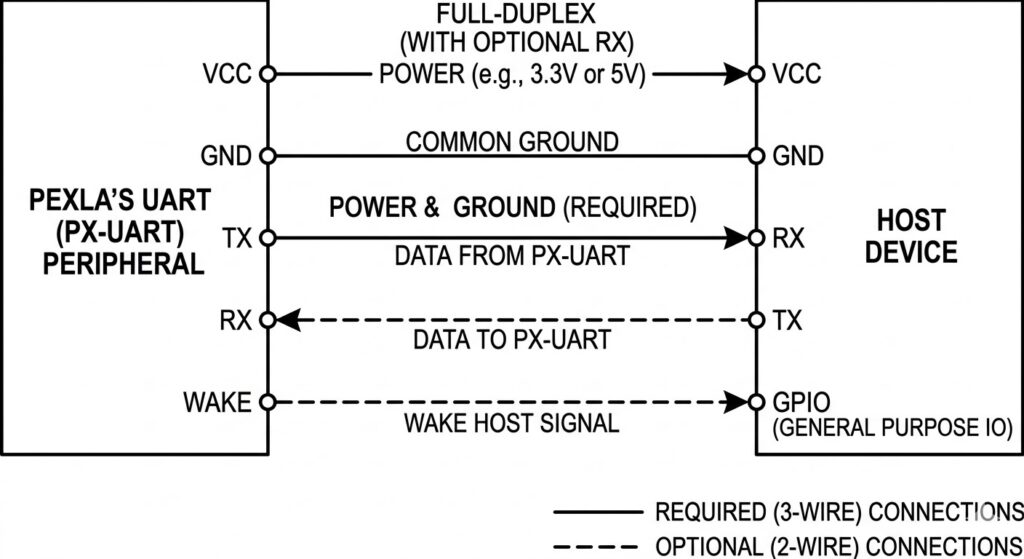
All API commands share a single consistent frame format over UART. The sensor accepts both string key names and numeric key IDs. Commands take effect immediately and the sensor echoes a confirmation. There is no mode-switching — commands and data coexist on the same wire.

Examples of API Commands:
- Write to Flash:
<<<*EnZoomIn=1>>> - Read RAM value:
<<<EnZoomIn?>>> - Write to RAM:
<<<EnZoomIn=1>>> - Read Flash value:
<<<*EnZoomIn?>>> - Burst read all:
<<<configurations?>>> - Factory reset:
<<<ResetConfigs=1>>>
/*
 * pexla_basic.ino
 * Minimal Pexla distance read — no API needed.
 * Tested: Arduino Uno, Nano, Mega
 *
 * Wiring:
 *   Pexla TX  →  Arduino RX (pin 0, or SoftwareSerial)
 *   Pexla RX  →  Arduino TX (pin 1)
 *   Pexla VCC →  3.3V or 5V (check sensor spec)
 *   Pexla GND →  GND
 */

#define PEXLA_BAUD  9600
#define BUF_SIZE    16

char    buf[BUF_SIZE];
uint8_t buf_idx = 0;

void setup() {
    Serial.begin(115200);       /* Debug output to PC */
    Serial1.begin(PEXLA_BAUD); /* Pexla on hardware UART1 */
    Serial.println("Pexla Basic Reader — waiting for data...");
}

void loop() {
    while (Serial1.available()) {
        char c = Serial1.read();
        if (c == '\n' || c == '\r') {
            if (buf_idx > 0) {
                buf[buf_idx] = '\0';
                parse_frame(buf);
                buf_idx = 0;
            }
        } else if (buf_idx < BUF_SIZE - 1) {
            buf[buf_idx++] = c;
        }
    }
}

void parse_frame(const char *line) {
    /* Default output: "R12345" → distance 12345 mm */
    if (line[0] == 'R') {
        long dist_mm = atol(&line[1]);
        Serial.print("Distance: ");
        Serial.print(dist_mm);
        Serial.println(" mm");
    }
}
"""
pexla_basic.py
Minimal Pexla read loop — no API configuration needed.
Requires: pip install pyserial
"""
import serial
PORT = '/dev/ttyUSB0' # Windows: 'COM3', macOS: '/dev/cu.usbserial-...'
BAUDRATE = 9600 # Pexla default baud rate
def main():
with serial.Serial(PORT, BAUDRATE, timeout=2) as sensor:
print(f"Connected to {PORT} @ {BAUDRATE} bps")
print("Reading distance (mm). Press Ctrl-C to stop.\n")
while True:
line = sensor.readline().decode('ascii', errors='ignore').strip()
# Default output frame: "R1234" where 1234 is mm distance
if line.startswith('R') and line[1:].isdigit():
distance_mm = int(line[1:])
print(f"Distance: {distance_mm:5d} mm ({distance_mm / 1000:.3f} m)")
if __name__ == '__main__':
main()Lorem ipsum dolor sit amet, consectetur adipiscing elit. Ut elit tellus, luctus nec ullamcorper mattis, pulvinar dapibus leo.
Selected parameters for the four optimization areas. Prefix with * to persist to Flash. Full parameter list available in the Pexla API documentation.
| Parameter | Type / Range | Default | Description |
|---|---|---|---|
| Filtering & Accuracy | |||
SendIterationCnt | int / 1–64 | 1 | Radar bursts averaged per output frame. Higher = smoother but slower update rate. |
EnZoomIn | bool / 0,1 | 0 | Enable zoom-in window around detected peak. Reduces false returns from foam and walls. |
ZoomInThresh | int / mm | 1800 | Half-width of zoom-in window in mm. Lock-on range around primary target. |
RadSortMethod | int / 0–3 | 0 | 0=nearest, 1=strongest, 2=zone priority, 3=custom weight. |
| Multiple Target Tracking | |||
RadNumTargets | int / 1–10 | 1 | Number of simultaneous targets reported per frame. |
EnMultiTarget | bool / 0,1 | 0 | Enable multi-target output format. Required for RadNumTargets > 1. |
TargetZoneMin | int / mm | 0 | Minimum range for zone-priority target selection. |
TargetZoneMax | int / mm | 23000 | Maximum range for zone-priority target selection. |
| Power Management | |||
EnSleep | bool / 0,1 | 0 | Enable STOP2 sleep mode between measurements. 3–8.5µA sleep current. |
SleepDelay | int / ms | 1000 | Duration of sleep period between measurement cycles in milliseconds. |
BurstCount | int / 1–32 | 1 | Number of measurements taken per wake cycle before returning to sleep. |
WakePin | bool / 0,1 | 0 | Enable external GPIO wake from STOP2 sleep on rising edge. |
| Threshold Offloading | |||
ThreshHigh | int / mm | 0 | High watermark. Assert threshold pin if distance < this value. |
ThreshLow | int / mm | 23000 | Low watermark. Assert threshold pin if distance > this value. |
ThreshMode | int / 0–2 | 0 | 0=disabled, 1=active-high, 2=active-low output on threshold pin. |
ThreshHysteresis | int / mm | 0 | Dead-band around threshold to prevent chatter on noisy surfaces. |
| Output & Format | |||
BaudRate | int | 9600 | UART baud rate. Supported: 9600, 19200, 38400, 115200, 230400, 500000. |
OutputRate | int / Hz | 1 | Output frame rate in Hz, independent of measurement rate. |
EnTemp | bool / 0,1 | 0 | Append internal temperature (°C × 10) to each output frame. |
configurations | read-only | — | Burst-read: returns all current RAM settings in one response. |
ResetConfigs | write / 1 | — | Factory reset all parameters to firmware defaults. |